AI Bank Statement Generator
Generate fictional transaction activity for a practice statement, then review the dates, amounts, and running balance using Preplity’s live preview.
Preplity generates bank statement documents for personal planning and practice. Official statements come from your bank.
Go from a blank page to a working lesson
An empty spreadsheet asks you to invent every line before you can practice reading one. Preplity lets you generate transaction activity, then use the preview to spot patterns you want to study. A small set of obvious purchases can help a first-time learner. A busier month gives a class more to discuss.
Use Regenerate to explore another set when the first version doesn’t illustrate your idea. Keep the version that actually supports the lesson. One useful question for a group is which line best explains the biggest balance change and how they know.

Build a lesson around one question
Give a learner a short task before you show the transaction list. Ask which two transactions they would compare to explain the balance after a recurring bill. Generate a new set if the first has too much going on or if the entries aren’t easy to discuss. Choosing the right level of detail is part of designing the lesson.
For a second round, ask them to explain which entries are money coming in and which are money going out. Let them reason it through on their own, then use the preview to point to the surrounding context. Save the stronger exercise so you can reuse it the next time you teach the same skill.
Follow the activity in the preview
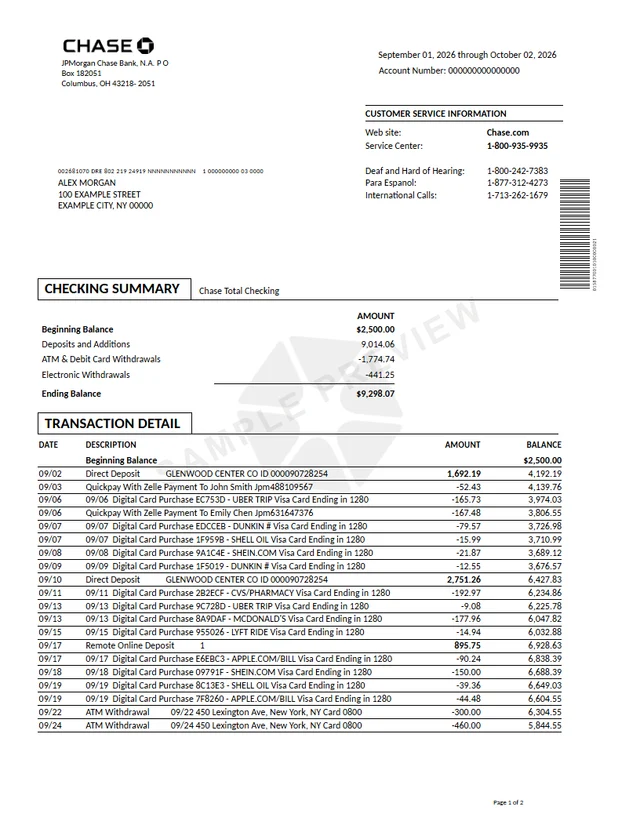
Open a bank document and see where the dates, deposits, and withdrawals appear.
Read the cycle before you read the balance
The statement period marks a slice of activity. It can run from one calendar month into the next, depending on the account. Use the opening and closing dates to decide whether a transaction belongs in the period you’re reviewing. If an expected expense is absent, check the preceding or following cycle before drawing a conclusion.
A practice exercise is to imagine a purchase on the last day of the period. If it posts in the next cycle, you might remember paying for it in the earlier month even though it appears later on the statement. Writing down the purchase date and posting date as two separate facts helps reconcile the apparent mismatch.
You can also compare an earlier closing balance with the next opening balance. In a continuous set of statements for one account, that comparison is a fast way to spot a missing cycle. In the editor, try one period first and only expand your practice document after you’re comfortable explaining the transition.
Give deposits and withdrawals different jobs
Deposits explain where money came from during the cycle. Withdrawals describe what left the account. Within those groups, a paycheck, a transfer, a refund, and a purchase tell different stories. A transfer between accounts can increase the balance here without representing new household income.
Take a short list of invented transactions and annotate them on a separate sheet. Mark the items you expect to see again next month. Then identify anything that might be a one-time expense. This is where a bank statement becomes useful as a starting point for budgeting. You can see when money moved, then decide what category makes sense for your own review.
If there are multiple accounts in your exercise, keep each record separate. Mixing both sides of a transfer on the same list can distort your totals. Treat the receiving and sending entries as two views of one transfer. Compare the timing and amount separately so the exercise still tells the right story.
Check the balance with a small reconciliation
Start with the opening balance. Add whatever came in, subtract whatever went out, and compare the result with the closing balance. Fees, interest, or other line items may be separate categories, so check how the layout accounts for them before treating a difference as a missing transaction.
The running balance answers a different question. It tells you where the account stood after a particular line posted. Try starting halfway through the period and work forward from a single transaction. If the next line is a withdrawal, the running balance should move by the amount shown. This kind of small check can be more informative than scanning the last page first.
If you can’t explain a difference, write the arithmetic down. Check the sign, the amount, and the point at which you started. In an actual account, verify differences with the bank rather than attempting to reconcile them by changing the original PDF.
Set up a practice session you can pick up later
Open one of the available bank layouts and choose the period you want to study. Use invented details rather than copying a sensitive account record. Select Generate when the details are ready, then use the preview to see how they fit on the page. Change one thing at a time so you can tell which edit caused the difference.
Want to teach the same concept twice? Keep one version as your starting point and explore a different set of activity in a second document. Give each a name you can recognize later. When you come back to this browser, My Documents is where you’ll find the work you saved.
A useful finishing exercise is to summarize the document without repeating every line. Say what period it covers, what caused the largest change, and whether the balance went up or down. That quick explanation is a skill you can use any time you open a real statement.
Compare the balance before you keep it
Check the same point in two versions to see how timing changes the balance.
Decide what you want to keep
A live preview is often enough to answer a quick question about layout. Download when you need a portable document for a practice exercise, a private walkthrough, or a class discussion. Check the period and entries before you confirm. Expense descriptions and date formats can be easier to notice in the full preview than in individual form fields.
Give downloads descriptive names that separate them from your actual account records. If you share material with someone else, explain the purpose up front and say where they should start reading. For a classroom or workshop, ask one person to explain the summary and another to walk through the running balance. That creates a useful comparison without exposing anyone’s bank details.
For anything submitted to a lender, landlord, employer, or agency, use the original records the recipient asks for. Practice in Preplity and handle those records as separate work.

Turn the review into a repeatable habit
A good first review can take longer than you expect. Start with the parts you already know and leave a note about anything you are unsure of. On a second pass, try to find the same information more quickly. The goal is to have a routine you can use again, even when a statement comes from a different account.
Work with a clear sequence. Identify the account and period, compare opening and closing balances, then look at the movement in between. If you find a confusing entry, record what you know about it and what you still need to check. If a real line is unfamiliar, use the contact details in your bank’s app or website to ask about it.
If you’re teaching or learning together, invite another person to explain the same practice document in a different order. One person might start with the account summary. Another might trace the middle of the month first. Compare the approaches and agree on a short checklist that helps you get to the answer.
The next time you open Preplity, pick one thing to try differently. Shorten the period, choose another layout, or discuss a different kind of transaction. Save a separate version so you can see exactly what changed. Over time the practice turns into a process rather than another page of numbers to guess your way through.
Put it into practice
Generation gives you transaction activity to inspect. Run through the balance yourself and keep the preview that illustrates what you’re learning.
Preplity generates bank statement documents for personal planning and practice. Official statements come from your bank.
Common questions
How should I start if I’ve never read a statement?
Choose one document with a short period and just a few changes to follow. Find the opening and closing dates first, then trace one deposit or withdrawal. Try explaining out loud what happened to the balance. When that feels straightforward, open a different layout and look for the same pieces in a different order.
Do I have to download to use the preview?
You can use the editor and its preview to review the activity before deciding whether you need a PDF. For example, if you only want to learn where the opening balance sits, start with the on-screen version. Downloads are a separate step. Check the pricing and preview before confirming a purchase.
Can I pick up the same activity later?
Open My Documents in the same browser you used for the original work. Read the saved version before clicking Regenerate. If the saved activity is the one you’re studying, keep it. Create another version if you want to work through a different month without losing the one you already understand.
How do I keep a classroom exercise easy to follow?
Give the class one question at a time. Ask them to locate the statement dates before asking for the amount of a transaction. That way everyone starts with the same period. Before sharing any material, check that the account activity and identifying details are invented, and make the purpose clear in your instructions.
How can I tell if I’ve picked a good practice document?
Look for an exercise you can explain in a short paragraph. If you can say which period it covers, identify the change in balance, and explain one item that affected the total, it gives you enough to work with. If there are too many unrelated questions at once, simplify the entries or narrow the period.
Keep exploring

Create your bank statement document
Open your document, make it yours, and download instantly.