AI Proof of Address Generator
AI can help you organize your checklist and figure out what to request. The record used for verification needs to come from an approved issuer or another source the recipient accepts.
Preplity can help you practice reviewing an address on a bank document. For verification, use the records your recipient accepts.
Turn a messy checklist into a plan
An address request is often an organization problem. One appointment might accept a bank statement while another wants a signed lease or a recent utility bill. Try organizing the requirements into a short table with an AI assistant, then open Preplity to learn how to find the relevant fields on a practice bank document.
You can describe the task without giving an AI tool your personal information. Ask it to organize dates, allowed document types, or questions to ask an office. Then check its result against the original instructions. Decisions about acceptance belong to the organization asking for the record.

Try a privacy-friendly prompt
Ask an AI assistant to organize a list of requirements into three columns for accepted records, deadlines, and questions. Use placeholders like “my recent move” and “appointment in four weeks.” Add only the instructions the office publishes. Leave account data, names, and addresses out while you work on the checklist.
Compare the summary to those instructions before using it. Then open a bank document in Preplity with invented details and practice locating the address and dates. You’ll get two things out of the exercise: an organized list and a clearer idea of where to find information on the actual record.
Find the address block in the preview
Open a practice bank document to see where the name and mailing address appear.
Start with the organization asking for proof
Ask which records count before you spend time collecting them. Write down whether the organization wants a current statement, signed lease, recent bill, letter, or other record. Check whether it accepts electronic files and whether it requires an original, a complete PDF, or another format.
Ask how it defines current. It might use the date the statement was issued, the date the period ended, or the date you apply. Write down the exact rule alongside the appointment date. If the organization gives you several options, begin with something you can obtain securely and that clearly shows the details it needs.
Save the instructions with the name of the organization and the date you checked them. If you’re preparing for several appointments, keep a separate list for each. A record accepted by one office may need something extra for the next one.
Find the fields that matter
A recurring challenge is knowing where to look. A bank document often pulls the holder’s name, mailing address, and dates into different parts of the page. Use Preplity’s bank statement editor to get familiar with that layout through a practice document. Look for the name first, then the full address, then the period or issue date.
Have an apartment number or direction on your street? Check that it appears in the right place. A name on a separate page or an address missing one part might need explanation. The issuer can tell you how to update the information it uses, and the organization requesting the document can tell you whether what you already have is acceptable.
Ask before sending additional information the organization didn’t request. If there are several pages, check the submission instructions before leaving any out. Use its approved channel and ask if there is a secure upload option when the record contains private information.
Plan for a move or shared household
After a move, your next statement might take a while to reflect an address update. Check with the provider about its cycle and the date a newly issued document will be available. If your appointment is sooner, ask the recipient which other accepted record you can obtain.
Sharing an apartment makes this more common. A utility bill may be in someone else’s name even when you pay part of it. Ask whether the agency has a dedicated process for people who live with family, roommates, or a host. Save its instructions so you can bring the correct supporting records the first time.
If a name mismatch reflects a recent change, ask how the recipient wants it handled. Avoid relying on a guess about abbreviations or formatting. Bring the documentation it tells you to bring and keep a separate note about questions you still need to ask.
Keep a preparation copy separate
Use a named checklist for deadlines and items you still need to gather. A simple structure works well. List the requirement, who can provide it, and what you still need to check. If you want to rehearse locating information, open a practice bank document in Preplity and identify its address and dates without entering a real account number.
Once you’ve practiced, set aside the rehearsal and compare the original evidence with the recipient’s checklist. Write any unresolved question in your preparation notes. If you have to request another copy, make sure the request goes through a channel you recognize.
After each appointment, record what you actually submitted and whether there was follow-up. If you need to repeat the process for a different service, reuse the checklist structure and get new requirements directly. Your old notes can tell you which questions to ask first.
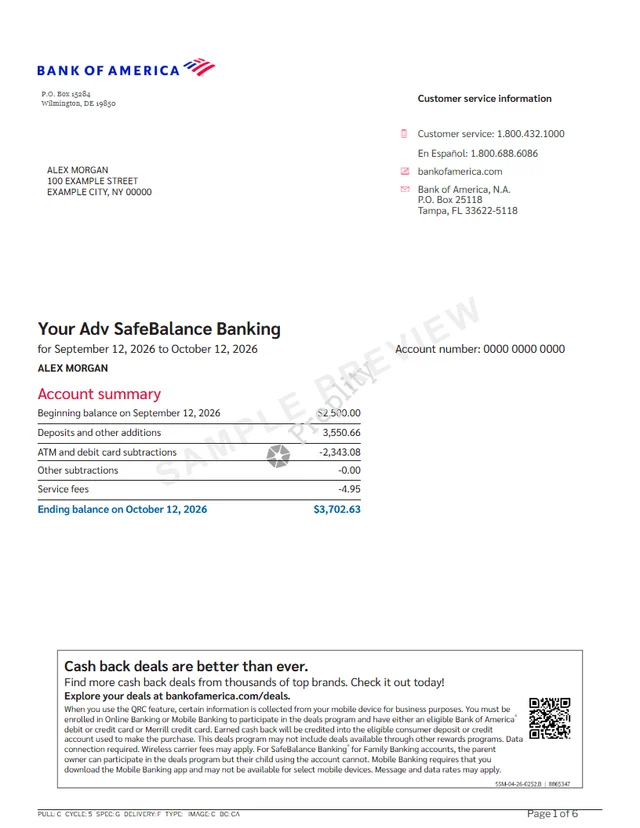
Review the address and dates together
Use the preview to rehearse finding the fields you’ll need to check on your own record.
Do a final review before sending
Check readability on the device you’ll use to submit the document. Open it from the location where you saved it and make sure you selected the intended file. If submission happens in person, ask whether they’ll need to see a printed document, ID, or additional evidence.
If the recipient has a file limit, use its instructions about acceptable format and size. Avoid sharing records in group email or through public links. Organize your originals in a private location and open them for review only when needed.
A useful way to finish is to explain the submission in one sentence. Name who asked, what type of evidence they accepted, and whether you have the right issue date. If any of those details are uncertain, follow up before the deadline.

Make one checklist you can reuse
If you move often or handle paperwork for a household, build a simple place to record instructions. Give each request its own row and write down the date you checked it. Record the approved channel for submission and the name of the office or service involved. That keeps an old set of instructions from getting mixed up with a new request.
When you talk to an office, ask one concrete question at a time. A question like whether an online PDF is accepted for an in-person appointment is easier to answer than a general question about which records count. Record the answer and any exceptions you were given. If you’re unsure how it applies to your situation, ask for the original instructions.
Use the checklist with a practice document first. Find the parts of the page that correspond to each requirement. Then open the record you plan to submit and repeat the steps. If there’s a detail you can’t locate, call the issuer or ask the recipient what it accepts before trying a different file.
After the request is complete, keep your checklist accessible and store or dispose of sensitive records appropriately. You can reuse the structure the next time you need it, even when the requirements change. The time you saved organizing this request can make the next one easier.
Put it into practice
Give AI a list of the accepted document types and generic dates. Keep your real address, account numbers, and original PDFs out of the prompt unless you have a specific reason and permission to share them.
Preplity can help you practice reviewing an address on a bank document. For verification, use the records your recipient accepts.
Common questions
Does Preplity issue proof of address?
Preplity can help you practice finding an address and a statement date in a bank document. For an actual submission, start with the list of records your organization accepts and request one through the appropriate issuer. If you’re unsure whether a particular document qualifies, ask before sending it.
What if my new address isn’t on the record yet?
Ask the issuer when the updated information will appear and what it can provide in the meantime. If your appointment comes first, ask the recipient which other types of records it accepts. Keep any answer with your checklist so you can refer to the exact instructions when you collect your documents.
Can I use the same checklist for different organizations?
Reuse the structure and make a fresh copy for each organization. Check the date limit, allowed document types, and any instructions about the name or address format. Using separate copies helps you remember which organization supplied which rule. It also gives you a place to record questions that only apply to one request.
What if my first and last names appear differently?
Read the instructions carefully and ask how the recipient wants name differences handled. There may be a process for a change of name or a limited set of additional records it accepts. Note the answer and bring or upload what it asks for. The issuer can explain how to correct its record if that is necessary.
What should I review the day before my appointment?
Check that you have the accepted record, that it covers the right date range, and that it opens from the location where you saved it. Look at your appointment instructions for any ID or supporting records needed. If the instructions mention both an electronic and a printed copy, prepare whichever versions the recipient requests.
How can I use AI without sharing my real address?
Use placeholders to describe the situation and ask for help organizing questions, deadlines, or the list of accepted records. You usually don’t need to paste an account statement to do that. Verify the summary against the original requirements, then keep the actual records in their approved submission channel.
Keep exploring

Create your bank statement document
Open your document, make it yours, and download instantly.